AI music generation has crossed a threshold. In 2026, tools that convert written words into fully produced songs — complete with vocals, melody, harmony, and rhythm — are no longer experimental. They’re production-ready.
But there’s a gap between users who type a vague description and get something generic, and users who understand how to work with the AI to get studio-quality output. The difference almost always comes down to how well you write your prompt. This guide breaks down the practical techniques that separate good results from great ones — all illustrated using text to song features on ToMusic.ai.
The Frustrations Most Creators Hit Early On
Before diving into techniques, it helps to name the problems that send users searching for better approaches.
Vague prompts produce generic output — Telling an AI to “make a sad song” yields something technically correct but emotionally flat. The AI has too much interpretive freedom and defaults to the average.
Wrong model for the job — Not all AI music models are optimized for the same task. Using a fast-generation model for a cinematic orchestral track, or a vocal-focused model for a quick background track, wastes time and produces mismatched results.
Poor lyric structure — AI music generators work best when lyrics follow a clear song structure. Unstructured text produces awkward phrasing, misaligned melody, and inconsistent delivery.
No style direction — Mood, tempo, and instrumentation hints are not optional extras. They’re core inputs. Omitting them forces the AI to guess, and the guess is rarely what you had in mind.
Iterating blindly — Regenerating with the same prompt hoping for a different result is inefficient. Small, targeted adjustments to specific parameters produce dramatically better outcomes.
These are solvable problems — and each tip below addresses one directly.
7 Tips for Getting Better Results with Text to Song AI
Tip 1: Lead with Genre, Mood, and Tempo Together
The single highest-impact change most users can make is to front-load their prompts with three specifics: genre, emotional tone, and tempo. Instead of “upbeat song about summer,” write “upbeat indie-pop, major key, mid-tempo, energetic and nostalgic, about a road trip in summer.”
The AI doesn’t need poetry — it needs coordinates. Providing all three elements simultaneously reduces interpretive variance and pulls output much closer to your intended direction.
Tip 2: Use Song Structure Tags in Custom Mode
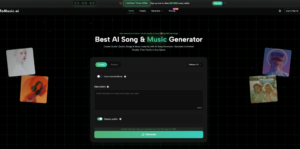
ToMusic.ai’s Custom Mode supports structure tags that tell the AI exactly how to organize your song. Tags like [Verse], [Chorus], [Bridge], [Intro], and [Outro] map directly to musical sections, ensuring the generated track follows a coherent arrangement rather than an undifferentiated block of audio.
This is the most underused feature among new users. A properly tagged lyric input produces a song that sounds deliberately composed — with dynamic build, contrasting sections, and a recognizable structure that listeners expect.
Tip 3: Match the AI Model to the Task
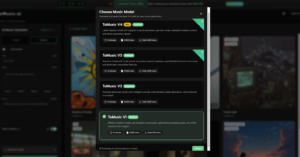
ToMusic.ai provides four distinct AI models, and choosing the right one for each project is as important as writing a good prompt:
- ToMusic V4 — Best for professional vocal performances. Use this when authentic, emotionally expressive singing is the primary requirement.
- ToMusic V3 — Optimized for complex harmonic structures and innovative rhythmic patterns. Best for jazz, R&B, and genre-blending work.
- ToMusic V2 — Extended 8-minute compositions with cinematic and ambient depth. Ideal for film scoring, game background music, and meditation tracks.
- ToMusic V1 — Fast, reliable, balanced. Best for high-volume content production where turnaround speed matters more than maximum expressiveness.
Running the same prompt on the wrong model is one of the most common reasons outputs feel “off.” The model selection screen is not cosmetic — it’s a core creative decision.
Tip 4: Specify Vocal Characteristics Explicitly
When creating songs with vocals, vague style direction produces vague vocal delivery. ToMusic.ai’s AI responds well to explicit vocal descriptors. Phrases like “male vocals, warm and raspy, conversational delivery” or “female vocals, powerful, operatic on the chorus, soft on the verse” give the model enough direction to produce a specific, textured performance.
This applies to instrumental choices too. Specifying “acoustic guitar lead, no drums in the intro, synth pad underneath” produces a far more intentional sonic arrangement than leaving instrumentation to chance.
Tip 5: Iterate Systematically, Not Randomly
When a generation doesn’t land, change one variable at a time. If the melody feels right but the vocals are off, adjust only the vocal descriptor and regenerate. If the arrangement works but the genre feels wrong, change only the style tag.
ToMusic.ai saves all generations to your cloud library, which makes this kind of systematic iteration practical — you can go back to any previous version and compare against a targeted change without losing work.
Tip 6: Generate Multiple Versions in Parallel
Rather than committing to a single prompt and iterating from one result, generate three to four variations simultaneously with slight differences in mood or style framing. This reveals how sensitive the output is to specific inputs and often surfaces a version that feels closer to the target than any single “best guess” prompt would produce.
This approach is especially useful for commercial work — when you need to A/B test music for an ad campaign or a game level, having multiple stylistically adjacent options makes the selection process faster and more confident.
Tip 7: Use Descriptive Scene-Setting for Instrumental Tracks
For instrumental-only tracks — background music, cinematic scores, podcast intros — the most effective prompts don’t describe musical elements directly. They describe a scene or emotional state and let the AI translate that into sound.
“The feeling of arriving home after a long trip at dusk — warm, slightly melancholic, slow-building, orchestral with a simple piano melody” produces richer output than “slow orchestral piano piece.” The AI has been trained on vast amounts of music attached to emotional and narrative context. Scene-based prompts activate that context far more effectively than purely technical descriptions.
How to Put These Tips into Practice
Here’s how these tips combine into a practical creation session using the text to song AI on ToMusic.ai:
- Define your output type — Vocal song, instrumental track, or jingle? This determines whether you use Simple or Custom mode.
- Select your model — Match V1–V4 to your project’s primary requirement (speed, vocals, harmony, or length).
- Write a structured prompt — Include genre, mood, tempo, and (if vocal) singer characteristics. For lyrics, add structure tags.
- Generate 2–3 parallel versions — Small prompt variations, same core direction.
- Evaluate and isolate the variable — Identify what works and what doesn’t, then adjust only that element.
- Download and use — All tracks come with full commercial rights and royalty-free licensing, no attribution required.
ToMusic.ai vs Other Text-to-Song Platforms
| Platform | AI Models | Max Duration | Vocal Quality | Commercial License | Free Tier |
| ToMusic.ai | 4 (V1–V4) | 8 minutes | Genuine, expressive | Full commercial | Yes (8 songs) |
| Suno | 1 (Chirp v3) | ~4 minutes | Good | Limited on free tier | Yes |
| Udio | 1 | ~1.5 minutes | Good | Varies by plan | Yes |
| Soundraw | N/A (loop-based) | Custom | No vocals | Commercial | Paid only |
| Mubert | N/A (stream-based) | Continuous | No vocals | Attribution required | Limited |
ToMusic.ai’s multi-model architecture is the clearest differentiator in the table above. Having four purpose-built models — rather than one general-purpose model — means the platform can be genuinely optimized for different creative outputs rather than compromising between them.
Conclusion
The gap between average and excellent AI music output isn’t talent — it’s technique. The seven tips in this guide apply to any text-to-song workflow, but they’re most directly actionable on a platform designed to give you genuine creative control.
If you haven’t tried ToMusic.ai yet, the free tier lets you generate up to 8 songs with no payment required. Explore the model selector, experiment with Custom Mode and structure tags, and see how much of a difference deliberate prompting makes.
Visit ToMusic.ai and start your first generation — your prompts are the only instrument you need.
(DISCLAIMER: The information in this article does not necessarily reflect the views of The Global Hues. We make no representation or warranty of any kind, express or implied, regarding the accuracy, adequacy, validity, reliability, availability or completeness of any information in this article.)
Must Read:
- S Jaishankar: Meet Veteran Diplomat Shaping India’s Foreign Policy
- Top 10 Forex Traders in India – Updated Ranking & Insights
- The Media Beacon
- SHIV NADAR: A PHENOMENAL BUSINESS TYCOON