The AI creative landscape has exploded. There are now hundreds of tools for generating videos, editing photos, removing backgrounds, creating animations, upscaling images, and dozens of other tasks. The problem isn’t a shortage of options — it’s the opposite. Creators are drowning in tools scattered across different platforms, paywalls, and interfaces, each with its own learning curve.
What’s been missing is a single, well-organized hub where you can discover, preview, and launch any AI creative tool instantly. That’s exactly what SuperMaker AI Video & Image tool is built to solve.
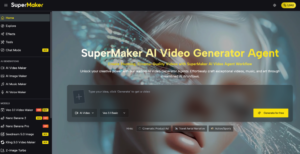
What Is the SuperMaker AI Tools Hub?
The SuperMaker AI Tools Hub is a centralized library of AI-powered creative tools covering two primary domains: video creation and image editing. Rather than building a single monolithic product, SuperMaker has assembled a wide-ranging suite of specialized tools — each purpose-built for a specific creative task — and organized them into a clean, browsable catalogue that anyone can access with one click.
The hub currently features tools across two main categories:
- Video Tools — for generating, editing, animating, and transforming video content
- Image Tools — for creating, enhancing, retouching, and stylizing images
Both categories are free to explore with no account required for basic access.
Video Tools: What’s Available
The video tools section covers the full spectrum of modern content creation needs. Here’s a breakdown of what’s included:
Generation & Creation
Text to Video — Type a prompt and generate a video scene from scratch. Ideal for content creators who want to visualize scripts or produce B-rolls without a camera.
AI Picture to Video — Upload a static image and the AI generates realistic motion around the subject. A fast way to turn product photos or portraits into dynamic content.
Draw to Video — Sketch a rough concept or scene layout, and the AI renders it into a finished video. Great for storyboarders and concept artists.
Bulk Video Generator — Produce multiple video variations simultaneously. An essential time-saver for marketing teams that need volume without sacrificing consistency.
AI TikTok Video Generator — Purpose-built for short-form vertical content optimized for TikTok’s format and engagement patterns.
AI Shorts — Similar short-form optimization, tailored for YouTube Shorts. Handles framing, pacing, and format automatically.
Animation & Motion
AI Animate Photo Tool — Bring any still photo to life with natural, fluid movement. Popular for portrait content, product showcases, and social media storytelling.
Live 2D Animations — Transform flat illustrations into animated sequences. Particularly useful for artists and designers who want to add motion to their work.
Animate Replace — Swap out elements within an existing video while preserving the surrounding motion context. Useful for remixing or updating existing content.
Kling 2.6 Motion Control — Precision-based motion control powered by the Kling model, giving creators fine-grained control over how subjects move within a scene.
Editing & Enhancement
Video to Video — Apply style or content transformations to existing footage. Change the look, tone, or visual style of a clip without reshooting.
Lip Sync Video Generator — Synchronize mouth movement to any audio track. Widely used for dubbing, educational content, and social media voiceover videos.
AI Video Transition — Generate smooth, professional transitions between scenes — no editing software required.
AI Video Extender — Lengthen existing video clips by generating additional frames that seamlessly continue the original motion and context.
First Last Frame to Video — Define a starting image and an ending image, and the AI generates the motion between them. A powerful tool for narrative and cinematic content.
AI GIF Generator — Convert video clips or images into optimized, shareable GIFs — a staple format for social media reactions and meme content.
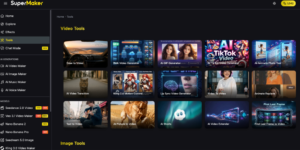
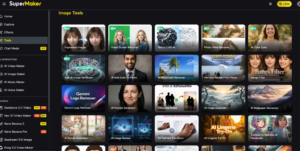
Image Tools: What’s Available
The image tools section is even more expansive, covering everything from quick fixes to full creative transformations.
Photo Enhancement & Repair
- Unpixelate Images — Restore clarity to blurry or low-resolution photos using AI upscaling. Useful for rescuing old images or improving compressed web photos.
- AI Image Upscaler — increases image resolution without quality loss. Essential for print materials, large-format displays, or high-DPI screens.
- Photo Glare Remover — Automatically detect and eliminate unwanted lens glare and reflections from photos — a common problem with product and outdoor photography.
- AI Open Eyes — Fix photos where the subject’s eyes are closed. The AI generates a natural open-eye version while preserving the rest of the image.
- AI Skin Texture Enhancer — Smooth and enhance skin texture in portrait photos while maintaining a natural, realistic appearance.
- Green Screen Remover — Remove green screen backgrounds and replace them with any desired backdrop. No manual masking is required.
- AI Watermark Remover — Clean watermarks from images automatically, useful for restoring original photos.
Creative Transformation
- Photo to Cartoon Tool — Transform any photograph into a stylized cartoon illustration. Popular for profile pictures, avatars, and branded mascots.
- Photo to Anime — Render photos in anime art style. One of the most consistently popular tools for fan communities and creative social content.
- Cartoon to Realistic AI Generator — The reverse of photo-to-cartoon: take illustrated or drawn characters and render them in photorealistic style.
- Photo to Sketch — Convert photos into pencil sketch or line art style. Useful for artistic projects, design references, and stylized branding.
- AI Style Transfer — Apply the visual style of one image to the content of another. Classic artistic technique is made accessible in seconds.
- AI Caricature Maker — Generate exaggerated, stylized caricature portraits from photos. Great for event content, gifts, and novelty social media posts.
- 3D Camera Transform — Apply a 3D parallax depth effect to flat images, simulating camera movement through a still photo.
- 3D Camera Control — More advanced version of 3D camera effects with user-controlled movement parameters.
Object & Content Editing
- Remove Object from Photo — Select and remove any unwanted object from an image, with AI filling in the background naturally.
- Remove People From Photo — Specifically optimized for removing human subjects from scenes, useful for background photography and architectural shots.
- Add People To Photo — The complement — insert realistic human figures into existing scenes or backgrounds.
- AI Image Expander — Extend the borders of any image outward, with AI generating new content that matches the existing visual context. Also called outpainting.
- AI Image Extender — Similar functionality with slightly different optimization for landscape and architectural content.
- Add Text to Image — Overlay clean, formatted text directly onto images with intelligent placement and style matching.
- Image Text Editor — Edit existing text within images without disrupting the surrounding visual elements.
Design & Generation
- Text to Image Tool — Generate images from text prompts. The foundational AI image creation workflow, optimized for speed and quality.
- Image to Image — Use an existing image as a visual reference while generating a new variation with modified style, content, or composition.
- AI Portrait Generator — Create realistic or stylized portrait photographs from text descriptions or uploaded references.
- AI Wallpaper Generator — generate high-resolution desktop or mobile wallpapers in a wide range of styles and themes.
- AI Anime Generator — Create original anime-style artwork from text prompts, with control over character design, scene, and mood.
- AI Icon Generator — Design clean, consistent icon sets for apps, websites, and UI projects.
- Ad Image Generator — Generate platform-optimized advertising images with proper dimensions, visual hierarchy, and call-to-action placement.
- Brochure Design — Create professional marketing brochure layouts with AI-assisted design and content placement.
- 3D Text Generator — Generate visually striking 3D typography for logos, headers, and promotional materials.
- Pie Chart Generator — Create clean, visually polished data visualization charts from raw numbers.
- Silhouette Maker — Extract and isolate subject silhouettes from photos, useful for logos, posters, and graphic design.
- Transparent Background Maker — Remove backgrounds entirely, outputting images with transparency for use in composite designs.
Style & Appearance
- AI Outfit Generator — Generate outfit suggestions or clothing visualizations on figures, useful for fashion brands and e-commerce.
- AI Color Changer — modify the color of specific objects or areas within an image. Useful for product variant photography.
- AI Skin Color Changer — Adjust skin tone in portrait photography for representation, diversity testing, or artistic purposes.
- AI Cinematic Photo Filter — Apply high-end cinematic color grading to photos, simulating the look of film-quality post-processing.
- Bangs Filter — Visualize how different hairstyles with bangs would look on a subject. Popular for hair styling and beauty content.
- AI Meme Generator — Create formatted meme templates with AI-generated text overlays. Instantly shareable social content.
- AI Mugshot Generator — Generate stylized mugshot-format portraits for comedic content, games, or creative projects.
- Gemini Logo Remover — Cleanly remove the Gemini logo from AI-generated images for cleaner final outputs.
Why Unified Tools Hub Matters
The real value of SuperMaker’s approach isn’t any single tool — it’s the organization. Most creators waste significant time hunting across different platforms for the right tool for each task. SuperMaker’s hub solves this by:
Smart categorization — Tools are organized by purpose and media type, so you can find what you need without knowing its exact name in advance.
One-click launching — No complex onboarding. Browse, click, and start creating. Basic access requires no account creation.
Consistent interface — Every tool follows the same UX patterns, so there’s no learning curve when switching between tools.
Integrated ecosystem — Tools don’t exist in isolation. Output from one tool can flow directly into another, building multi-step creative workflows without leaving the platform.
Constant updates — New tools are added regularly based on trending content formats and community requests.
Who Benefits Most
Freelancers and solo creators gain access to a full creative studio without paying for a dozen separate subscriptions. Whether you need to remove a background, animate a photo, generate a TikTok video, or upscale an image for print — it’s all in one place.
Marketing teams benefit most from the bulk generation tools and ad-specific options. The Bulk Video Generator, Ad Image Generator, and Bulk AI Image Generator enable the kind of volume production that previously required dedicated creative departments.
Educators and course creators can use the hub’s animation, illustration, and video tools to produce engaging visual content for lessons without any design or filmmaking background.
Developers and product teams will find the icon generators, UI-focused image tools, and diagram features useful for rapid prototyping and product documentation.
Getting Started
The entire SuperMaker AI Tools Hub is free to browse and use at the basic level — no sign-up required. For higher-volume production, commercial licensing, or access to premium features, SuperMaker AI offers subscription plans currently available at 40% off.
Whether you need one specific tool today or want to explore the full range of what AI-assisted content creation looks like in 2026, the hub is one of the most practical starting points available.
(DISCLAIMER: The information in this article does not necessarily reflect the views of The Global Hues. We make no representation or warranty of any kind, express or implied, regarding the accuracy, adequacy, validity, reliability, availability or completeness of any information in this article.)
Must Read:
- S Jaishankar: Meet Veteran Diplomat Shaping India’s Foreign Policy
- Top 10 Forex Traders in India – Updated Ranking & Insights
- The Media Beacon
- SHIV NADAR: A PHENOMENAL BUSINESS TYCOON