Ever wondered what if your important text messages get deleted from your iPhone? Losing texts on an iPhone can be distressing, especially if it contains personal memories, OTPs, work-related details, or important conversations. Whether messages were deleted accidentally or lost due to a system issue, there are multiple effective ways to recover them.
In this article, we’ll explore different iPhone data recovery methods that you can try to recover deleted text messages on iPhone, starting from the simplest methods to advanced recovery techniques.
Common Reasons for Text Message Loss on an iPhone
There are several reasons why your text messages get deleted from your iPhone. Identifying the exact reason helps you in determining adequate recovery workarounds. Some main reasons for text message loss include:
Accidental Deletion
One of the most common reasons is simply deleting a conversation by mistake. A swipe or tap in the Apple Messages app can instantly remove entire message threads without warning.
iOS Update Issues
Sometimes, recent iOS version updates may cause temporary glitches or syncing errors, leading to missing or disappearing messages.
Factory Reset or Device Restore
Performing a factory reset erases all data, including messages. If you reset your device without restoring from a backup, those messages are permanently lost.
iCloud Sync Problems
If you’re using iCloud for syncing messages, issues like incomplete sync, disabled settings, or network errors can cause messages to disappear across devices.
Jailbreaking the iPhone
Jailbreaking your iPhone can interfere with system stability and security, increasing the chances of data loss, including text messages.
Storage Issues
If your iPhone storage is full, the system may behave unpredictably, sometimes affecting apps like Messages and leading to missing data.
Quick Methods to Recover Deleted Text Messages on iPhone
Now that you’re familiar with a few reasons for text message deletion on your iPhone, it’s time to apply adequate recovery workarounds. Just go with the below iPhone data recovery methods one by one to get your deleted text messages back:
Method 01: Recover from the Recently Deleted Folder
Many latest iOS devices (iOS 16 and Above) provide an in-built Recently Deleted folder in the Messages app that temporarily stores all your deleted texts. Here’s how you can recover your deleted text messages from this folder:
- Firstly, launch the Messages app on your iPhone.
- Tap on Filters from the top-left corner, then select Recently Deleted.
- Select the messages you want to recover and click Recover.
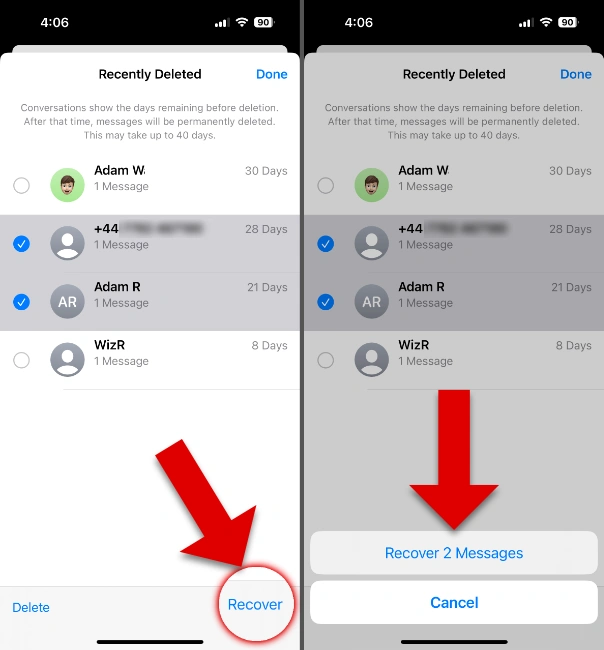
Note: Messages stay in the Recently Deleted folder only for 30 days, after which they get permanently erased.
Method 02: Restore Messages from iCloud Backup
If you’ve synced your iPhone with iCloud backups, your deleted text messages might be present here. Follow the below steps to get your texts back using iCloud backups:
- Launch the Settings app, then go to General > Transfer or Reset iPhone.
- Now, click on “Erase All Content and Settings”.
- Set up your iPhone again and choose Restore from iCloud Backup.
- Select a backup containing your messages and save them to your device.
Method 03: Recover Deleted Text Messages Using iTunes/Finder Backup
Another backup alternative that you can try to recover deleted text messages on your iPhone is via using iTunes (Windows) or Finder (Mac) backups. All you have to do is:
- Firstly, connect your iPhone to the Windows or Mac system containing backups.
- Launch iTunes or Finder, then select your iPhone device.
- Click Restore Backup and choose the most relevant backup that you want to restore.
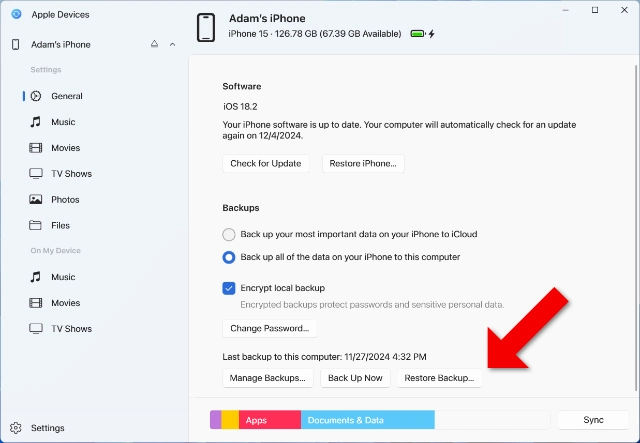
- Click “Restore” to start the process.
How to Recover Deleted Text Messages on iPhone Without Backups?
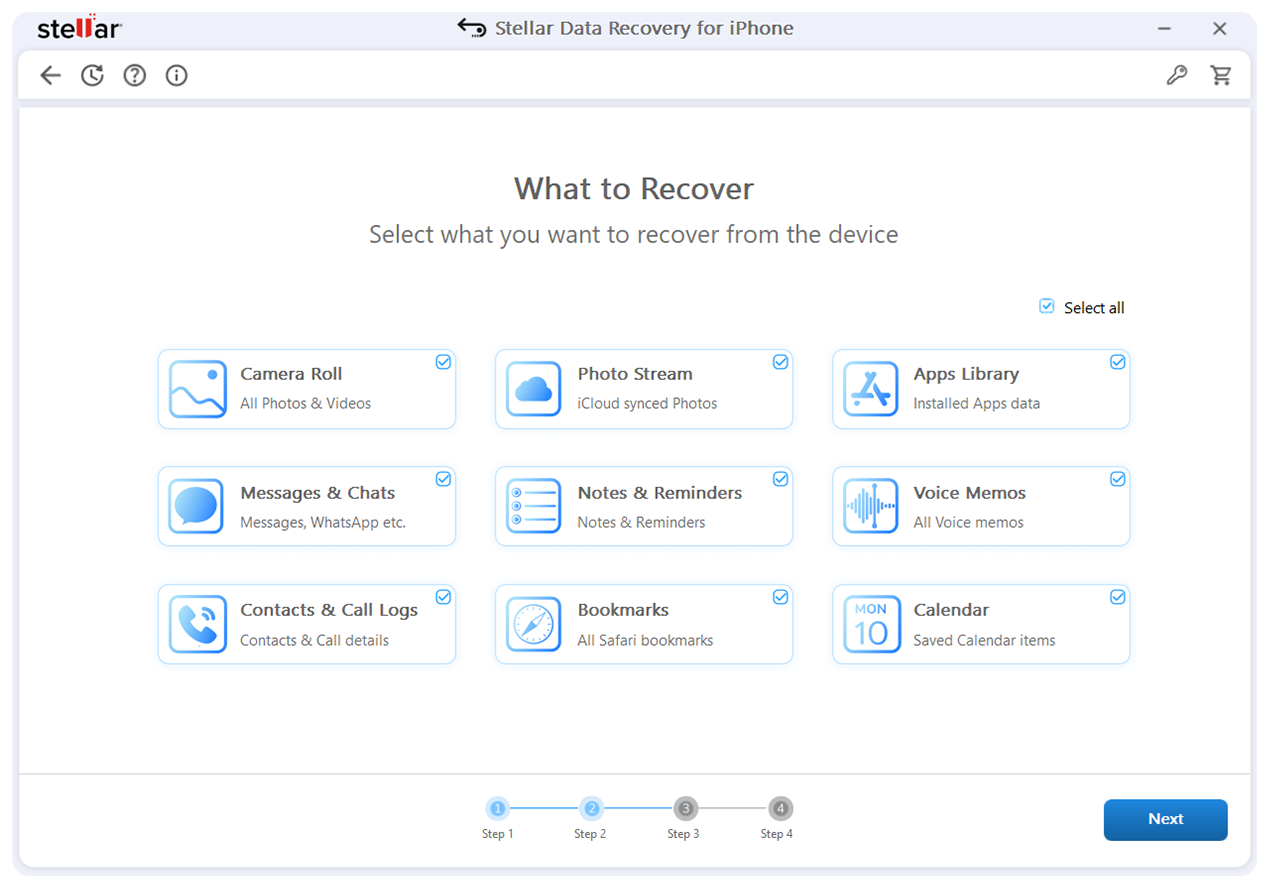
If you don’t have a backup of your deleted text messages, try third-party data recovery software for iPhone to get your lost texts back. There are several data recovery software for iPhone available online, such as Stellar Data Recovery for iPhone, which you can use to restore your deleted texts and other types of files. These tools are designed to scan deeply and recover data that hasn’t yet been overwritten. Before you opt for any iPhone data recovery software, it’s important to check its features and then select the one that best fits your needs.
When Should You Use Data Recovery Software for iPhone?
Ideally, a professional iPhone data recovery software helps in the following instances:
- No iCloud or iTunes backup exists
- Messages are permanently deleted
- A factory reset was performed without backup
- You need selective recovery (not full restore)
Unlike manual methods, these tools provide deep scanning, preview options, and targeted recovery, making the process much easier and more effective.
Key Features of iPhone Data Recovery Software
As mentioned, checking the features of these recovery tools helps you in finding the best option for you. Most professional tools offer the following features:
- Deep Scan Technology: Performs an in-depth scan of iPhone storage to locate deleted messages that are not visible through normal methods.
- Preview Before Recovery: This feature allows you to preview the recoverable messages beforehand, ensuring only the required data is restored and avoiding unnecessary recovery.
- Multiple Data Types Support: Ensure your data recovery software for iPhone supports recovery of various data types, including messages, photos, videos, contacts, etc.
- User-Friendly Interface: Designed with a simple and intuitive interface, making it easy for beginners and non-technical users to perform recovery smoothly.
Best Practices to Prevent Message Loss
Prevention is always better than recovery. Here are some additional preventive measures that you can consider to safeguard your messages:
- Enable iCloud Backup: Go to Settings, tap your Apple ID, open iCloud Backup, and turn it ON to automatically back up your data regularly.
- Use Messages in iCloud: Enable Messages syncing in iCloud so all your conversations stay updated and accessible across your Apple devices seamlessly.
- Avoid Unnecessary Deletion: Always double-check before deleting any conversation or message thread to prevent accidental loss of important personal or professional information.
Wrapping Up
Recovering deleted text messages from an iPhone may seem like a challenging task, especially if you don’t have any backup. However, recovering lost messages is easily possible if you act quickly and choose the right method. The easiest way is through the Recently Deleted folder, while backups (iCloud or iTunes) offer reliable recovery options. However, if you don’t have any backup, professional iPhone data recovery software such as Stellar Data Recovery for iPhone can be the best option.
By following the methods in this guide, you can significantly improve your chances of recovering lost messages and keeping your important conversations safe.
(DISCLAIMER: The information in this article does not necessarily reflect the views of The Global Hues. We make no representation or warranty of any kind, express or implied, regarding the accuracy, adequacy, validity, reliability, availability or completeness of any information in this article.)
Must Read:
- Your Custom Home – Careful Considerations
- Innovative Interior Design Trends To Refresh Your Home
- How to Choose Living Room Furniture That Stands Up to Active Lifestyles